

Details
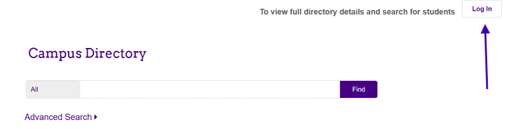
Have you recently visited the JMU Campus Directory, clicked the “Log In” button, and noticed that it redirects to Outlook? This is intentional, and you may want to know more about this new search feature and how it works. If so, please read on.
The feature of Outlook now leveraged by the Campus Directory is called the Global Address List, or GAL. The GAL provides a more powerful search than was previously available, and it lists everyone with an active JMU account, so you won’t miss anyone!
Note: Employees can still be found in the traditional campus directory without clicking “Log In,” but students can only be found using the GAL search.
Reaching the GAL from the Campus Directory
From the Campus Directory, click the Log In button. If you have not already signed into a Microsoft application (such as email) using your JMU account in the current browser session, you will be prompted to sign in.
Searching the GAL
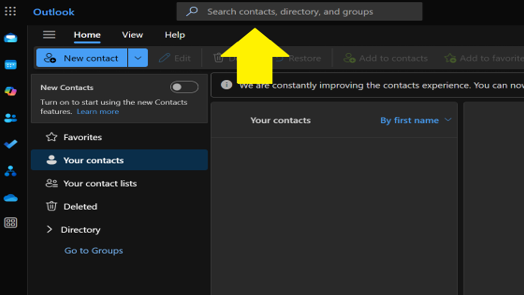
In Outlook, you will notice the Search bar at the top which says, “Search contacts, directory, and groups.” When you enter anything in this box, Outlook will search the GAL and will return matching students, faculty, staff, and departmental email addresses. You can enter first name, last name, eID or JMU email as search terms. A results list will be returned, and clicking any name will allow you to see contact information including email and other information, if available (title, department, and phone are typically only available for employees).
Questions?
The IT Help Desk is always willing to assist with questions about the use of the directory, GAL, or any Microsoft product. Please feel free to reach out to us at (540)568-3555 or helpdesk@jmu.edu.
Symptoms
- Why do I get sent to Outlook when I try to log into the Campus Directory
- Why did the Campus Directory Login change