
Skip to content
logo logoSelf Service
Sign In Sign Up
  • Home
  • Knowledgebase
Back

"Couldn’t verify your identity E0000001" when Loading Okta Verify on iPhone

Updated 09/04/2025 10:13:08 AM
  • PDF
  • Print
  • Copy To Clipboard
  • Collapse All Expand All

Details

This article is for:
  • users having issues enrolling Multifactor Authentication (MFA) using Okta Verify on an iPhone device, even after resetting MFA
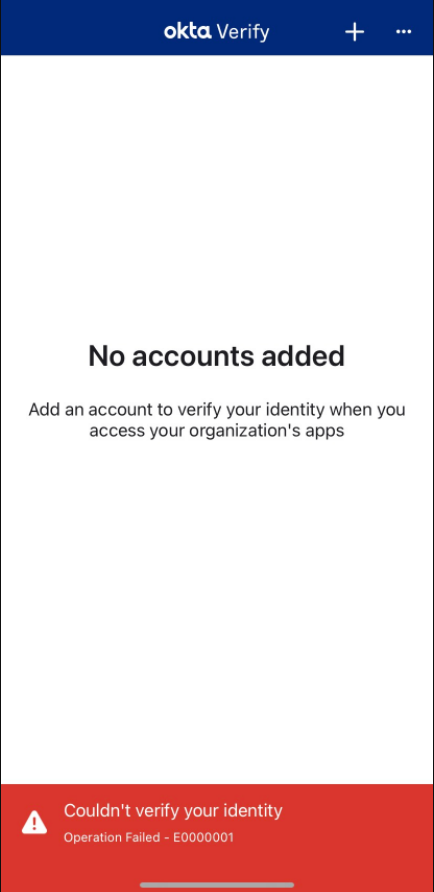
  • users getting the below error on an iPhone device:
Couldn't verify your identity Operation Failed - E0000001
 
rtaImage.png
 
Cause

Cached network settings not flushing for new MFA setup

Solution
  1. Go to iPhone Settings.
  2. Tap on General > Transfer or Reset iPhone.
  3. Tap on Reset.
  4. Reset Location & Privacy > Enter lock screen passcode.
  5. Return to Transfer or Reset iPhone > Reset > Reset Network Settings > Enter lock screen passcode.
Image
  1. The phone will reboot once confirmed.
  2. Once the phone is rebooted fully, retry the steps to setup Okta Verify.

Symptoms

  • Unable to active Okta Verify
  • Operation Failed - E0000001
  • Couldn't verify your Identity 
Keywords: error okta iphone E0000001 operation-failed Verify iOS TDX

Call The IT Help Desk

Call 540-568-3555

Related Solutions

  • When is my JMU eID Disabled
  • How to Add or Remove an Okta Device
  • Activating your JMU eID, and Enrolling in Okta for the First Time
  • What is Okta FastPass and Passwordless Authentication?
  • Unable to sign into BeInvolved
Solution ID
250313101838213
Last Modified Date
09/04/2025 10:13:08 AM
Taxonomy
  • Accounts and Access > Okta
Collections
  • External Collection
  • Faculty and Staff Content
  • Student Content

Solution to Copy:

Copy to Clipboard

Failed to download PDF file.

Problem creating pdf file for the solution: 250313101838213. Retry after some time.
Close

Acknowledged.

Thank you for acknowledging that you have read and understood this solution.

Failure.

Unable to acknowlege. An error occurred.
View More...
Knowledge
  • Knowledgebase
Helpful Links
  • IT Service Portal
  • IT Help Desk
  • JMU Statuspage
  • MyMadison
  • JMU Canvas
Show More...
Upland RightAnswers | Self Service - 2025R2.0.0
© Sun Apr 05 02:04:48 EDT 2026 Upland Software, Inc. All Rights Reserved