

Details
Microsoft is enforcing a new multifactor authentication requirement to access its Microsoft 365 products. For JMU to stay compliant with these new requirements, you will notice a change starting on October 12th in how a Duo push prompt is achieved when logging into Microsoft 365 applications.
Who does this affect?
Anyone within JMU IT who uses Duo for multifactor authentication, including employees, affiliates, students, and recent graduates.
What do I need to do?
Whenever you attempt to log in to any Microsoft 365 application (office.com, Outlook, etc.), you will need to click on Approve with JMU Duo to initiate a Duo prompt to complete the multifactor authentication process.
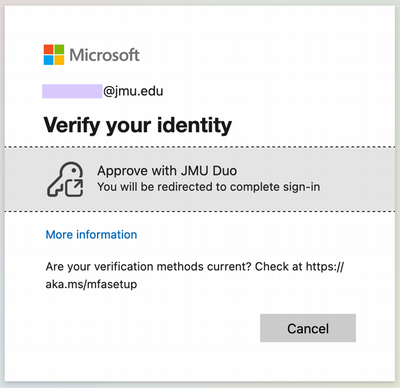
Note: If you use Microsoft Authenticator, Microsoft's own Multifator Authenticator service, you will be prompted to approve the Duo "This is my device" within Microsoft Authenticator after approving your Duo push to finalize logging in. If you do not need or wish to continue to use Microsoft Authenticator, you can simply uninstall the App from your device.
Questions/concerns?
Please reach out to the IT Help Desk at (540) 568-3555 or helpdesk@jmu.edu.
Symptoms
- Why am I being asked to use Microsoft Authenticator
- Why am I being asked to verify my Identity
- What is Approve with JMU Duo